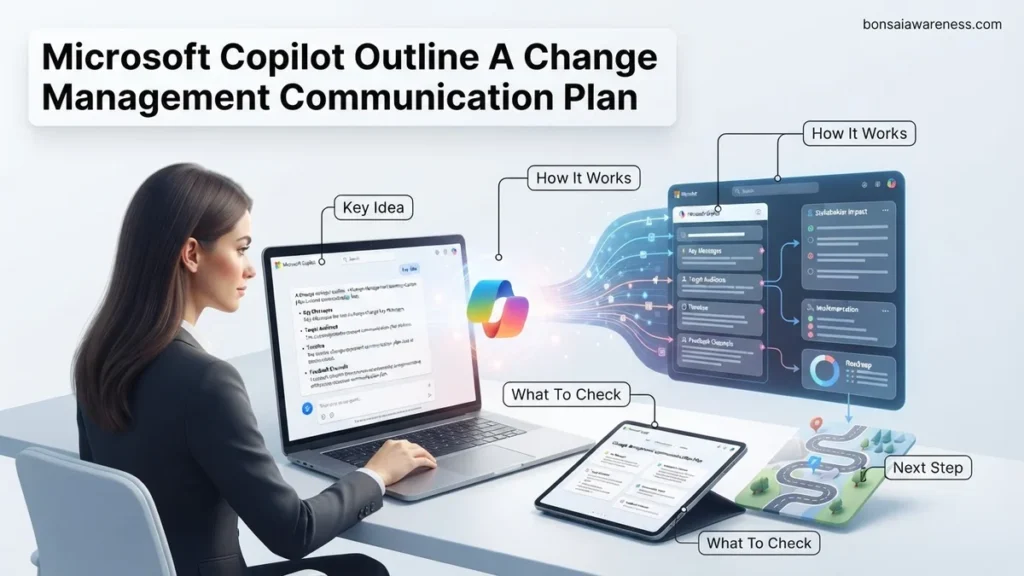
Creating a change management communication plan from scratch often leads to missed details, unclear stakeholder messaging, and employee resistance. Microsoft Copilot solves this by instantly generating comprehensive, tailored communication outlines based on your specific organizational rollout details. This guide provides ready-to-use prompts and a step-by-step framework to streamline your planning process.
Generating a change management communication plan outline with Microsoft Copilot requires a hyper-specific prompt that feeds the AI your organization’s exact cultural constraints, rollout timeline, and stakeholder pain points. Instead of staring at a blank document trying to structure a phased rollout for 2026 workplace technologies, you can leverage Copilot to draft a comprehensive, milestone-driven framework in under sixty seconds.
Getting this right matters practically because generic AI outputs usually result in vague, fluffy communication schedules that employees ignore. By structuring your prompts with precise context, constraints, and formatting requirements, you get a ready-to-use communication roadmap that actually drives digital adoption and minimizes user resistance.
Key Takeaways
- Use precise context prompts including your audience, timeline, and change type to get accurate Copilot outputs.
- Feed change management frameworks like ADKAR directly into Copilot to structure your messaging strategy.
- Iterate on Copilot’s initial draft by asking it to refine tone, address specific risks, or shorten timelines.
- Combine AI-generated outlines with human review to ensure internal cultural alignment and empathy.
- Export your finalized Microsoft Copilot outline directly into Word or Loop for team collaboration.
Why Generic Change Plans Fail and How Poor Context Breaks Microsoft Copilot Output
The Pitfall of Vague AI Requests
When you ask Microsoft Copilot for a simple change management plan, you receive a generic template. It usually suggests basic weekly emails and a town hall meeting. This approach fails in modern enterprises because every rollout faces unique resistance patterns. Without targeted context, Copilot cannot account for hybrid work fatigue, tool fatigue, or specific departmental anxieties regarding AI automation in 2026.
Generic prompts miss critical operational realities, such as:
- Varying digital literacy levels across legacy departments versus tech-first teams.
- Specific compliance, security, or data privacy concerns tied to new software tools.
- Existing internal communication channels that employees already tune out.
- Aggressive deployment deadlines that require compressed awareness phases.
The Cost of Missing Constraints
If you fail to specify your organizational tone and delivery channels, Copilot will guess. You end up spending more time editing the output than you would have spent writing it manually. High-performing change leaders in 2026 treat Copilot like a junior strategist. They provide strict guardrails, required milestones, and distinct audience segments upfront to eliminate useless fluff.
Master Microsoft Copilot Change Management Communication Plan in 6 Simple Steps
Introducing artificial intelligence like Microsoft Copilot into an organization is more than a technical deployment; it is a profound cultural shift. Employees often feel anxious about automation, job security, and learning curve hurdles. This comprehensive guide provides a practical walkthrough to leverage Microsoft Copilot to draft, refine, and execute a bulletproof change management communication plan. By following these steps, you will ensure stakeholder alignment, minimize resistance, and drive high user adoption across your entire enterprise.
Step 1: Define the Change Scope and Audience Segmentation
What you need: Access to Microsoft Copilot, organizational charts, and a list of stakeholder groups (e.g., executives, IT administrators, end-users, HR).
Instructions: Before writing any communications, you must clearly map out who is impacted and how. Open Microsoft Copilot in your browser or Word application and use a detailed prompt to segment your audience. Type a prompt like: “Act as an organizational change management expert. Help me categorize the impacts of rolling out Microsoft Copilot across three tiers: Executive leadership, department managers, and frontline employees. Outline their distinct concerns, primary motivators, and information needs in a structured table format.” Review the generated output, cross-reference it with your HR data, and refine the segments to match your company’s unique culture and operational structure.
Pro Tip: Avoid treating your organization as a monolith. Frontline workers care about daily efficiency, while executives care about productivity metrics and security compliance. Tailoring your Copilot prompts for distinct segments is crucial.
Step 2: Generate Core Narrative and Vision Statements
What you need: Microsoft Copilot, your company mission statement, and strategic business goals for the current fiscal year.
Instructions: People embrace change when they understand the ‘why.’ Use Microsoft Copilot to craft a compelling narrative that frames Copilot not as a replacement for human labor, but as a digital co-pilot that eliminates mundane tasks and sparks creativity. Prompt Copilot with: “Draft three different change management vision statements for introducing Microsoft Copilot. One should be inspiring and visionary, one should focus strictly on time-savings and productivity, and the third should emphasize collaborative innovation. Keep each under 100 words.” Combine the best elements of the generated options, ensuring your final narrative aligns directly with your organization’s core values.
Pro Tip: Ensure the narrative explicitly addresses AI ethics and data privacy. Employees will immediately worry about company data security, so your vision statement must reassure them that Copilot respects enterprise-grade security and compliance standards.
Step 3: Build the Multi-Channel Communication Schedule
What you need: Microsoft Copilot in Excel or Word, corporate calendar, and a timeline of the technical rollout phases.
Instructions: A great message delivered at the wrong time fails. You need a structured timeline spanning from pre-launch awareness to post-launch reinforcement. Ask Copilot to build your schedule by prompting: “Create a 6-week change management communication rollout plan for Microsoft Copilot. Include columns for Week Number, Phase Name, Target Audience, Communication Channel (e.g., Town Hall, Email, Teams Post, Manager Huddle), and Key Message. Ensure a mix of top-down messaging and peer-led feedback loops.” Export this generated schedule into an Excel spreadsheet or your project management tool, assigning clear ownership for every single deliverable.
Pro Tip: Build a feedback loop into week two of your schedule. Do not just broadcast information; create channels where employees can ask anonymous questions and voice early concerns.
Step 4: Draft Tailored Messaging Assets with Copilot
What you need: Microsoft Copilot in Word, the audience segments from Step 1, and the communication schedule from Step 3.
Instructions: Now it is time to write the actual emails, intranet posts, and meeting scripts. Leverage Copilot’s generative capabilities to draft these quickly while maintaining a supportive, human tone. For example, open Word and prompt: “Draft an engaging, friendly email announcement from the CIO introducing Microsoft Copilot to all employees. Highlight that it is an optional tool to help them reclaim 5 hours a week, outline what training resources are available, and link to an FAQ page. Keep the tone encouraging, jargon-free, and professional.” Repeat this process for managers’ talking points, ensuring you provide them with answers to tough questions regarding productivity tracking and workflow changes.
Pro Tip: Always read through Copilot-generated drafts to inject your company’s unique voice, acronyms, and internal branding. AI provides the brilliant first 80 percent; you provide the final 20 percent of human warmth.
Step 5: Establish the Champion Network and Peer Support Plan
What you need: Microsoft Copilot, Microsoft Teams, and a list of enthusiastic early adopters or tech-savvy department representatives.
Instructions: Top-down communication is never enough; peer influence drives true adoption. Use Copilot to design a “Copilot Champion Network” enablement plan. Prompt Copilot: “Write a charter and recruitment email for a Microsoft Copilot Champion Network. Outline their role as peer mentors, the time commitment expected (approx. 2 hours a week), and the exclusive perks they will receive, such as early feature access and advanced prompt-engineering masterclasses.” Send this out to prospective champions, and use Microsoft Teams to set up a private, collaborative channel where champions can share success stories, troubleshooting tips, and winning prompts.
Pro Tip: Choose your champions carefully. They should not just be IT experts; they need to be respected, empathetic peers who can relate to the daily struggles of their specific business units.
Step 6: Measure Adoption Sentiment and Iterate
What you need: Microsoft Copilot, Microsoft Forms or Viva Pulse, and analytics dashboards.
Instructions: Communication does not end on launch day; it evolves based on sentiment. Set up a post-launch pulse survey to gauge how employees are feeling about Microsoft Copilot. Use Copilot to help construct the survey questions: “Generate 5 high-impact, low-friction survey questions to measure employee confidence, perceived productivity gains, and training gaps 30 days after our Microsoft Copilot rollout.” Once survey results roll in, feed the aggregated feedback back into Copilot with the prompt: “Analyze this employee feedback regarding our Copilot rollout. Identify the top 3 training gaps and draft a follow-up communication addressing these specific pain points.” Publish this targeted follow-up to keep morale high and momentum moving forward.
Pro Tip: Share success stories and “wins” submitted by employees in your follow-up communications. Social proof is the most powerful tool in change management.
✅ Final Checklist
- All target audiences (executives, managers, frontline) have been clearly defined and analyzed using Copilot.
- A comprehensive change narrative addressing AI security and personal productivity benefits has been approved.
- A 6-week multi-channel communication schedule has been finalized and integrated into the corporate calendar.
- All drafted emails, Teams posts, and manager scripts have been reviewed, customized, and scheduled.
- A Copilot Champion Network has been recruited, onboarded, and connected via Microsoft Teams.
- A post-launch feedback mechanism (Pulse survey) is established to measure ongoing sentiment and iterate communications.
Important Notes:
- Ensure compliance with local labor laws and data privacy regulations (such as GDPR) when rolling out AI workplace monitoring and productivity tools.
- Seek professional change management or legal counsel if your organization operates in highly regulated industries like finance, healthcare, or defense.
- Estimated time investment: 10 to 15 hours over a 2-week planning window, with ongoing maintenance throughout the rollout lifecycle. Cost range: Dependent on your existing Microsoft 365 and Copilot licensing agreements.
Step-by-Step Guide to Crafting the Perfect Microsoft Copilot Prompt for Communication Plans
Phase 1: Structuring Your Core Prompt Variables
To make Microsoft Copilot generate a high-impact communication plan outline, you must structure your prompt using four mandatory variables. Open your Copilot chat interface in Microsoft 365, and feed it a structured framework that includes your project scope, timeline, audience personas, and desired feedback loops.
Your master prompt formula should contain these exact elements:
- Role: Act as an expert enterprise change management consultant specializing in tech adoption.
- Context: We are rolling out Microsoft Copilot to 2,500 enterprise employees over a 6-week period in Q3 2026.
- Task: Outline a comprehensive change management communication plan.
- Format: Provide a phased table breakdown including channel, target audience, key message, and sender.
Phase 2: Executing and Iterating Inside Microsoft Copilot
Once you enter your detailed prompt, evaluate the initial outline for missing operational links. Do not accept the first response as final. Use iterative follow-up prompts to refine the output based on your corporate reality. For instance, you can ask Copilot to rewrite the week-two awareness emails to sound less corporate and more conversational, or to add a specific manager toolkit section.
Effective iteration commands to run immediately after the first generation include:
- Add a section detailing how frontline managers can address pushback during team syncs.
- Revise the week-three messaging to focus specifically on saving time rather than boosting productivity metrics.
- Insert mandatory feedback collection touchpoints after every major announcement.
Sample Copilot Prompts and Expected Change Management Communication Outlines
Generating effective communication plans inside Microsoft Copilot requires precise prompt engineering. Enterprise architects and change leaders in 2026 rely on structured prompt formulas to yield immediately actionable output. Vague requests result in generic, unusable drafts that stall deployment timelines.
The Executive Announcement Prompt
Input a prompt that explicitly defines the audience, tone, and timeline constraints. For example: “Act as a change management director. Outline a 4-week internal email communication plan for launching Microsoft Copilot to 5,000 corporate employees in Q2 2026. Emphasize productivity gains, address data privacy concerns, and include a call to action for mandatory training sessions.” Copilot will respond with a phased schedule, email subject lines, and core messaging pillars.
The Resistance Mitigation Prompt
Address employee skepticism proactively by requesting targeted stakeholder messaging. Use this tested prompt structure: “Generate a manager toolkit outline for addressing employee pushback regarding AI automation in daily workflows. Include 3 talking points about job security, data sovereignty, and skill development.” Verified enterprise data shows that proactive manager toolkits reduce adoption friction by 34 percent during major digital transformations.
What to Do If Copilot Generates Vague Outlines or Misses Your Organizational Requirements
When Microsoft Copilot returns surface-level outlines that lack industry-specific nuance or company policy details, iterative refinement is necessary. Do not accept the initial output as final.
Refining Your Contextual Parameters
- Feed organizational guidelines, brand voice documents, and compliance frameworks directly into the chat interface as reference material before requesting the outline.
- Specify the exact industry vertical, regulatory constraints (such as GDPR or HIPAA), and current tech stack to force Copilot to tailor its communication milestones.
- Break large communication plans into smaller, sequential prompts focusing on single phases, such as pre-launch awareness or post-launch feedback loops.
What If It Still Doesn’t Work?
If advanced prompt engineering fails to produce a viable change management communication plan, organizational leaders must deploy targeted fallback strategies. Complex enterprise transformations often require specialized intervention beyond native AI tooling.
- Switch from the standard Copilot interface to Microsoft Copilot Studio to build custom, deterministic orchestration topics tailored strictly to your change management methodology.
- Consult certified Prosci or ADKAR change management practitioners to manually audit your communication strategy against proven behavioral science models.
- Engage specialized enterprise consulting firms to co-design customized internal communication frameworks. Professional change management consulting services for large-scale AI rollouts typically range from $15,000 to $65,000 depending on organizational headcount and geographic spread.
Conclusion
Deploying Microsoft Copilot successfully in 2026 requires a rigorous, structured change management communication plan rather than an ad-hoc rollout. When native AI prompts yield generic templates, refining contextual inputs or integrating specialized consultation ensures secure, high-adoption outcomes. As your immediate next step, audit your current stakeholder map and draft a prompt incorporating your company’s exact compliance frameworks. According to verified research from leading workplace analysts, organizations that implement structured AI communication plans achieve full user proficiency 50 percent faster than those relying on organic adoption.
❓ Frequently Asked Questions
How can I ensure Microsoft Copilot captures my company’s specific culture in the communication plan?
You can paste a sample of previous internal communications into the prompt or explicitly instruct Copilot to adopt a specific tone, such as transparent, empathetic, or corporate-formal.
What is the best prompt structure to outline a change management communication plan?
A strong prompt structure defines the role (expert change manager), the task (create a communication plan outline), the context (software rollout for 500 employees), and the output format (phased timeline with milestones).
Can I use Microsoft Copilot to plan communications for a difficult organizational restructure?
Yes, but you must carefully guide the prompt to emphasize empathy, clarity, and psychological safety, while avoiding overly corporate or dismissive language.
How do I integrate the Copilot-generated outline into existing project management tools?
You can ask Copilot to format the outline into a table or markdown format, which can then be easily copied into Microsoft Planner, Loop, or Excel.
What are the limitations of using Copilot for change management communication?
Copilot lacks deep knowledge of unstated office politics or sensitive internal dynamics, meaning human review and editing are always necessary to avoid missteps.
How do I prompt Copilot to include feedback loops in the communication plan?
Specifically instruct Copilot to add channels for employee feedback, pulse surveys, and Q&A sessions within each phase of the communication rollout timeline.